Dash Cameras - What to look for?

Joined
Sep 4, 2013
Messages
1,047
Location
Cleveland
Bike
2010 ST1300
I think it is probably time for me to install a dash camera in our SUV. I've read our thread 'Dash Camera Recommendations' and will begin a search, BUT

I'm a novice at this. What features are important?
What memory cards/sticks are the most convenient?
Which brands/models are easiest to set up.
What questions did I not ask that I should have asked?
Any recommendations beyond the Thinkware M1; Innovv K5 or K6; or VSUBSO B6 suggested in the thread I mentioned above?

I'm looking for a dash camera to set up in my car and forget about it until it is needed. This will not be for making travelog videos - its to forestall the insurance/accident scam posted in a video in another thread.
 
Consumer Reports recommends Redtiger F7NP Basic. I've never heard of it to be honest. PC Mag recommendations.

The ones you mention are for motorcycles. Are you looking for one for a bike or a car (you initially said SUV)?
 
Are you looking for one for a bike or a car (you initially said SUV)?
Looking for a car to set up and forget (Toyota Highlander). I mentioned those names only because they were in the mentioned thread. Going to your PC mag suggestions now. Thanks.
 
Car units are designed differently. Space is not an issue for them, so many will mount on the windshield by your rear view mirror. I'd take a look at Amazon and look at what features are offered...which are actually important...and when you start narrowing your choice down, look to see what the reviews are.

As for reviews, skip the 5 star reviews. You know what they'll say..."It's great!" Go down instead to the 1 and 2 star ratings. Do they identify something that is actually a defect? Or are they trying to blame the dash cam for their own ignorance and incompetence? The 3 and some 4 star ratings tell me a lot too. They like the item...but there was a drawback. And look at the quantity of reviews. If there's a low number like 14 reviews, that's probably friends who got a free device for saying how much they love it. On the other hand, if there's 1000 ratings and they are mostly high...that's a good indicator.

The memory card is important. Size is not as important as speed. If it comes with its own memory card, I'd use that. But if it requires you to provide one, get one that is fast.

Ideally your dashcam is an "install and forget" device. You install it and every time you start the car, it starts. You park it, and it shuts down. You're not going to be posting online videos of your Toyota navigating the streets of Cleveland, so high quality specs are not important. What you want is something that'll let you identify the car that slammed into you at a stop light.

Memory card size isn't important. Any dash cam you buy should "loop" the newest recording over the oldest files. So if it will hold the last five minutes before the accident, that's about all that's necessary. They'll hold more than that though, even with a 128 GB memory card.

I'm interested in what you end up with and why. I'm thinking of getting one for my Subaru that might also double as a backup camera.

Chris
 
I'm interested in what you end up with and why. I'm thinking of getting one for my Subaru that might also double as a backup camera.

Chris
I'll let you know. One thing I have to figure out is how a dash cam sees to the rear. Do they communicate via bluetooth to a second cam on the rear window or do they look front and rear (thus rear view is limited)? I installed a backup camera on my GMC Savana van - bought the cam and screen from Crutchfield - this is backup only, nothing else (though the screen can be hooked up to a second video channel..... It works well and wiring it was not a big deal. After looking at Consumer Reports and PC Mag, both rated the Rove R2-4K highly and I am leaning in that direction because it is priced from $120 (Best buy) to $160 (Rove). Garmin's at $400 is more than I want to spend, especially since I don't know enough about why that cam is so great. I don't need or want a zillion features - just something that will record an accident in decent quality video. Being able to talk to people in my car via my phone and the cam seems redundant, as does voice control.

Still have to do more reading and looking.
 
I have been using Blackvue brand for at least 10 years with no issues other than one corrupted SD card, which the unit verbally announces if there is an issue with recording. Basically, a "set and forget" just for insurance purposes. You can change settings, but a decent size memory card will record about 8 hours worth at 5 minute individual files on loop recording. Hard knocks will trigger it to automatically lock a file. GPS data including speed overlays can be turned on for all recordings.

I was initially drawn to the Blackvue because they were one of the few that had a capacitor instead of a battery, which was the better option for Texas heat. Basically, just enough power if the car battery is lost to save a recording and shut down so there will be no corrupt files.

I have (thankfully) not needed it for any of my own insurance claims, but I have provided it for several that I have witnessed. One was a Chevrolet Silverado driver that rear ended stopped traffic at about 40mph. I was parked in the turn lane going the opposite direction. I of course put my name down as a witness and told the two cars that were rear-ended that I had a dashcam which I ended up providing to them upon request. The Silverado's insurance company called me later and asked "...and what was it that you ALLEGEDLY witnessed, sir". I got to reply with "oh, I didn't see anything, I didn't even know a wreck happened until I located what the noise that I heard was. But, my camera saw it all, including your client's cell phone fly out of his hand when he hit the car in front of him." I got an "oh, okay... thank you for your time." :roflmao:

Anyway, I highly recommend having one. All of my 4 wheel vehicles have front only (motorcycle has front and back), the front is pretty conclusive that you were rear-ended but of course will not show any information for the vehicle that hit you. I have found that almost all vehicles have power to the light/overhead console/garage door opener, I don't even bother running a dedicated wire to the fuse box anymore. My wife's Highlander has the sunroof, so I just tee into a "power on with key" wire in there. Makes it like a 3 foot run and I can use the exiting plastics for the mirror wiring on the windshield for a nice clean install. Generally I put the camera mostly hidden behind the rear view mirror, we don't even think about it unless we need to review recordings.

Lastly, pulling a video can either be accomplished by connecting via wifi to the unit itself through an APP, or how I do it, pull the SD card and plug it into a computer. If you pull it through your PC you do lose the overhead map view that the app provides.

This is the newest version of what I am using:
1778179573129.png

Good luck with your choice!
Ryan
 
I have cams on all vehicles and have for years. The only regret I have is that I didnt get a rear cam when I did my pickup. Cheaped out and have said numerous times to myself that I wish I had a rear cam when I have seen stuff happen in my rearview mirror. Plus, I have known people that got rear-ended and wished they had evidence. I think I can add one to mine and I should consider that. Be sure that the cam can communicate with an app so that you can review/transfer video on demand. The Innovv vids on my bike, while viewable on the screen can only be transferred to a PC or phone by removing the card and plugging it into a card reader... PIA. Obviously 1080p or 4K quality is a must as is night vision quality. I have a thinkware unit in my truck and it has worked flawlessly for 5 years. I have went through 4 or 5 cheap units over the years in different vehicles that couldnt take the abuse. I would never cheap out on a dashcam again. The last company I worked for bought all the drivers cheap cams (i mean REALLY cheap. The instructions were ONLY in chinese...lol) for our concrete mixers. Some only lasted a couple of days, although to be fair, that is pretty rough use, but still, a couple of days... LOL. Buy once, cry once
 
I had to promise my wife and daughter that I would disable the voice recording on our dashcam. On a completely unrelated note, I find my ears have this burning sensation quite a bit.....
I have the sound recording turned off on my truck cam and I always had it turned off on my work truck cam. I figured it was safer if there was no account of some of the things I said while driving...LOL
 
I have a Vantrue dash cam in each car. Very pleased with the results. Forward facing units only(both are 6 years old). If I were to upgrade, I would still stay with their products , but add the rear facing camera. I have recorded two accidents(1 deer strike & 1 with another car). Very useful in determining fault and what led up to the collision. Just remember that it can be a positive or negative when determining responsibility. The first thing I did after the car crash was remove it from the windshield and place it in my briefcase for later review.
 
I was going to respond directly to @SMSW in a DM, but decided to post here for everyone's benefit.

I purchased the Coolcrazy 4K dashcam last May and finally got around to installing it. https://www.amazon.com/dp/B0GHM2TV8Y?lv=shuf&channelId=600&plpRedirect=mhFallback I'm pleased with what it is doing, though my "needs" are not huge. I'm not looking for an action camera; I'm looking for something to prove who is at fault in an accident. The price now is about $76. For that price, it is a steal.

The listing on Amazon says:
Coolcrazy 4K Dash Cam Front and Rear, STARVIS Sensor, Free 128GB Card Included, 5GHz WiFi-up to 20MB/s, Dual Dash Camera for Cars, Built-in GPS, G-Sensor, WDR/HDR Super Night Vision, 24H Parking Mode

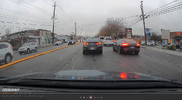
Camera resolution is pretty decent as you can see in this random screen capture. Blow it up and you'll see it is raining. Between the rain drops and wiper blades, I can easily make out the license plates of the two cars directly in front of me and probably those in the opposite lane as well.
1795296979626.png

Installation was fairly easy. The biggest difficulty I had was in getting the wire through the wire bundle rubber boot at the rear hatch. I have a Subaru Outback, so had to account for the hinge area at the rear window that you wouldn't have if you own a sedan.

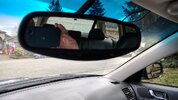
The interior looks decent, though I still need to tidy things up a bit.
1795297221988.jpeg

That's what it looks like from the driver's view. The body of the camera is behind the right side of the mirror. You can see two wires coming from the headliner to the camera. I'll clean those up when I tidy up the rest of the wires. When done, you won't even see those wires. The passenger will be able to see the camera from their seat, but that's not a big deal.

Lesson learned: String the wire from the front to the rear. I did it from the rear camera to the front. As mentioned above, what you can't see is the excess wire behind the mirror. It wouldn't bother some people, but it does bother me some. Not enough though to mess with it though in the cold and the rain. :)

The wires were easy to hide. Power on this camera comes from the cigarette lighter on the console. I tucked it behind the lower portion of the dash, then ran it up the "A" pillar to the top of the windshield and the camera. The rear camera wire was similar in that it went from the camera and up along the edge of the headliner. No need to disassemble things at all. I had some plastic tools for removing interior panels that worked great to either shove the wire in farther, or to pull the interior plastic piece back just a bit to tuck the wire under it. The hardest part of the installation was like it usually is -- picking up the tools to start.

There are lots of YouTube university videos on installing dash cameras and quite possibly one using your car model itself. They make the job easy enough that any of us can do it.

Peter aka @SMSW asked one other question about mounting the camera itself. This one mounts via a suction cup. At first, I couldn't get it to stay on for longer than 5 or 10 seconds. Then I got to looking in the instructions and they include three clear static cling plastic sheets. It was very simple to get the camera to stay on after using one of those. Clean your windshield. Place the static plastic sheet where you want it and then clamp the suction cup to that plastic sheet. It has stayed in place for over a week now. Another alternative is double-sided tape. Amazon carries some designed for installing things like dash cameras.

Would I buy it again? Yes. At $76 for this camera it makes you wonder what you're paying for in a higher priced dash cam, since even the higher priced ones are made in Asia if not China itself. You can also buy optional hard-wired in kits to eliminate the need for a 12V socket and make the install even cleaner.

And lastly, it is a true "install and forget" camera. The 5G wi-fi connection is for aligning your cameras and being able to download the video files. The included SD card is easily accessible on the right side of the camera body and will probably be your method for looking at the videos.

Chris

 
Last edited:
@Daboo, thanks for the report and details about the installation. I've been dragging on moving on this - mostly intimidated by running the wire from back to front but you make it sound doable.

How big is the SD card and how long will it record? I assume it loops when full - writing over the earliest entries. Do the files end when you shut the car off and begin a new file next time you start it? Date and time stamps?
 
They give you a 128GB mini SD card. A nice thing about that is you don't have to worry about compatibility or if it is fast enough to write the data without being overloaded. The size though is mostly immaterial. If you get into an accident, you don't care about what happened half an hour ago. What you're looking for is the moments before the accident. Who drove into who. What colour was the other car? Did they stick around, or drive off? What's the license plate of the vehicle that hit you? With that in mind, you could get by probably with a 16 GB card since it overwrites the oldest files when it runs out of room.

Whether it continues to run, or not, depends on what your power source is. I have two 12V power outlets. The one I'm using for this shuts off power when the car turns off. If I wanted to have it monitor the car while parked, I'd have to hard wire it in.

And yes, you do get a Date and Time Stamp, plus location.
1795302817615.png

Chris
 
I have a NextBase 622GW for which I also bought a rear view camera that plugs into the front camera unit on a long lead. I have nothing to compare it with, but I'm fussy, have had a number of camera on the bike over the years and I think that the video quality is excellent.
A word about the lead for the rear camera - it was installed professionally and they threaded it inside the roof lining - which is neat - but it interferes with DAB digital radio signals - so that weaker radio signals do not get through. No problem with FM. Unplug the rear camera and it works fine. One day I'll get round to re-routing it above the doors. It passes directly under the car aerial - which is a fin - centre rear of the roof.

Very fast processor 4k recording at 30fps, 1440p at 60fps, 1080p at 120fps. Excellent night time coverage. Look it up. I've had it about 3 years now, so they have probably improved on it. The sticky pad failed once on the windscreen last summer - very hot inside the car on the drive - but there was a spare pad in the box, and I've bought a couple more. Needs a Class 10 U3 micro SD card - not provided. I bought a 256Gb version - but it will overwrite old files when it runs out of space - except in the case of an 'event' - eg sudden deceleration, when it moves the before and after recordings to a protected area which cannot be overwritten. I've seen some false alarms, but better that that not keeping them at all. It just means that you may need to clean out the card once in a blue moon. Never done that, but I noticed that some files were in the protected area the last time I took the card out.

I hope not to ever have to push the button to get my What 3 Words location - but it is there if I want it.

Date / Time / Lat / Long / person - eg car reg can all be displayed, or not.

Current bike camera is an INNOVV K7 - front and rear - also excellent (wired bullet cameras). I'd be hard pushed to compare.

I turned off the image stabilisation feature - it seemed to make the number plates unreadable.
 
Last edited:
John, running the wires above the doors is simple. The only caution is if you have any air bags in the area you want to route the wires. If so, just make sure you run them behind the airbags, not in front of them.

You'll have a soft compressible cloth for the roof lining and the plastic trim is hard. The roof lining will compress allowing you to run the wires just under the edge of the plastic trim. It's not hard to slip it under.

Chris
 
Back
Top Bottom