Got it. Thanks guys.
Is this something relatively new? As I remember it, My Maps used to be integrated right in the regular Google maps site.
I bet I'll have more questions!
edit .. Here's a first observation.
As I open the above URL, this looks entirely different from what I remember (some time ago).
and
first thing it mentions is that it uploads stuff to drive, which I don't want anything to do with.
I never used it much in the past and still don't. However, it does appear different.
As far as having to upload to the cloud....I think you can have the gpx file resident on your computer and then just drag and drop it into the GM program. (at least is says you can)
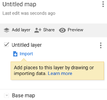
When it asks to create a map, click on "create". A pane will open up
that looks like
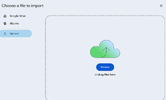
Click on "import" and you will get a pane that will give an option of
"upload" which,if you click will give you
Click on the "Browse" and it will allow you to bring in a gpx file stored on your own computer.
Yep, tried the above multiple times. It did not pull in the file.
Thanks for trying to help with this drrod. I'm generally quite patient with things, but not with computer stuff that should not be difficult. I'll try again when my frustration level eases!
If you just need to view gpx files you can do it with any 3rd party like kurviger, furkot, tyre , Motocurve (soon to come) and many others. softwares. No need google maps for it.
Back in the day I used google maps to create rides. But after they took it away, I'm using it just to lookup address and the yellow man to check the roads.




 )
)