Reset Windows PC for sale.

increasing

Site Supporter
Joined
Feb 28, 2025
Messages
301
Location
Oslo, Norway
Bike
ST1100AX
My old laptop with Windows 10 Home is being reset to factory settings for sale, has deleted everything and downloaded a new version of Windows 10 … Should not connect to the internet during startup and not register anything with Microsoft.

What do I choose here to move forward in the process?
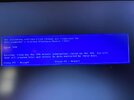
The following configuration change was requested for this computer's Trusted Platform Module (TPM):

Remove TPM.

Warning: Removing the TPM will erase information stored on the TPM. You will lose any keys you have created and access to data encrypted by those keys.

Press F1 = Accept. Press F2 = Decline

IMG_4734.jpeg
 
My old laptop with Windows 10 Home is being reset to factory settings for sale, has deleted everything and downloaded a new version of Windows 10 … Should not connect to the internet during startup and not register anything with Microsoft.

What do I choose here to move forward in the process?

Strange: WIN10 doesn't care about TPM, not sure why it would ask you to play with it.
 
Last edited:
Deleted everything and downloaded Windows 10 from the internet, performed the process twice.
Pardon my limited knowledge of Windows, but it is my understanding that if you delete a file, the computer simply removes it's directions to where that file is on the disk (or memory). That used to be called the FAT - file allocation table. But the file, which maybe located in a number of different sectors on the disk, remains either intact or in sections that are readable. So called recovery apps will look for these pieces - if the file was split up into sections. My point is simply deleting files, once twice whatever, does not completely erase them. To do that, you need to overwrite them. Apps will write 1's and 0's over the entire section that the files occupied, or if you are getting rid of a computer, the entire disk. This is done multiple times to be sure the data is really unreadable. I remember one program boasted it overwrote the disk 10 times.
 
I've heard the same thing, but I don't know anyone who does such a job. A friend of mine works with data here at the Norwegian Road Administration and where they have sensitive data, the hard drive itself is irradiated, which means destroyed.
 
Pardon my limited knowledge of Windows, but it is my understanding that if you delete a file, the computer simply removes it's directions to where that file is on the disk (or memory). That used to be called the FAT - file allocation table. But the file, which maybe located in a number of different sectors on the disk, remains either intact or in sections that are readable. So called recovery apps will look for these pieces - if the file was split up into sections. My point is simply deleting files, once twice whatever, does not completely erase them. To do that, you need to overwrite them. Apps will write 1's and 0's over the entire section that the files occupied, or if you are getting rid of a computer, the entire disk. This is done multiple times to be sure the data is really unreadable. I remember one program boasted it overwrote the disk 10 times.
A quick search on the web confirms your suspicions.

«Simply deleting files and reinstalling Windows is not enough to ensure that personal data is permanently deleted. To ensure data security, you need to perform a complete wipe that overwrites the hard drive. The safest method is to use a dedicated wipe tool or to physically destroy the hard drive before disposal as an e-waste disposal.»
 
Microcenter, a big computer store, used to sell a number of programs that did this disk erasing. I did a quick search... no idea if this example is any good.
 
If I have personal information on a hard drive, that hard drive NEVER leaves me, period! I would see about replacing the hard drive and then put windows 10 or 11 on the new drive!

Yes, I'm pyrenoid! :well1:
 
Found some info here and a dedicated program.

«Delete all old traces from the hard drive.

Even if you have moved the files from the PC, there will still be remnants of them on the hard drive - and thus it is also possible to recover them. So you should delete all traces on the PC before you let others take over it. With Secure Eraser, all traces are deleted, so you can safely pass the computer on. We have written about «Secure Eraser» in the magazine «Komputer for alle.» You can find the article there.»
 
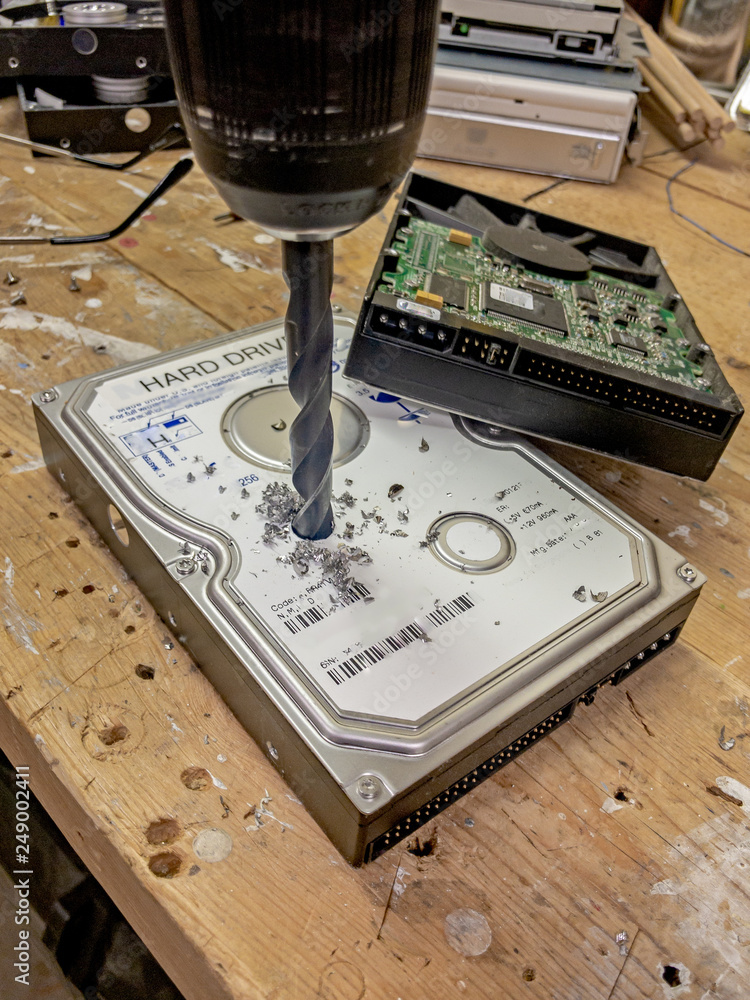
My personal, most reliable data wiper...

1000_F_249002411_1hmYD4rVGhHMHcY4e41mVIfK87I2H9j8.jpg
 
Found some info here and a dedicated program.

«Delete all old traces from the hard drive.

Even if you have moved the files from the PC, there will still be remnants of them on the hard drive - and thus it is also possible to recover them. So you should delete all traces on the PC before you let others take over it. With Secure Eraser, all traces are deleted, so you can safely pass the computer on. We have written about «Secure Eraser» in the magazine «Komputer for alle.» You can find the article there.»

Note it is more convoluted if you have an SSD.

Sometimes you can keep the HDD as is and install in the new PC (may or may not work, was lucky it worked for me). In this case no need to erase, just install the new HDD in the old PC.
 
Another unfortunate result of the criminal element ruining things for everyone. Donating old computers and cell phones to organizations that would refurbish them and pass them on to families who could not afford to buy them new used to be popular. I won't even consider this anymore. I remove the hard drive from any computer, including cell phones, and destroy it for my own protection. The rest of the item goes to an electronics recycler. This is a sad and unfortunate state for the less fortunate.
 
Another unfortunate result of the criminal element ruining things for everyone. Donating old computers and cell phones to organizations that would refurbish them and pass them on to families who could not afford to buy them new used to be popular. I won't even consider this anymore. I remove the hard drive from any computer, including cell phones, and destroy it for my own protection. The rest of the item goes to an electronics recycler. This is a sad and unfortunate state for the less fortunate.
Sounds reasonable :thumb: I have always sold my used iPhones and iPads as I feel they are safer after being factory reset and removed from my Apple account. Now I have been thinking about selling some Windows products, Found out I have two desktops and five laptops that are not being used and two of them have Windows 10 so maybe saleable …
 
Back
Top Bottom