
You are using an out of date browser. It may not display this or other websites correctly.
You should upgrade or use an alternative browser.
You should upgrade or use an alternative browser.
Wanted European (or France) maps micro SD card
- Thread starter FastST
- Start date


I'd suggest going OSM...
you'd get a 'Europe all' set FOC and can use the Garmin Map Installer (or Base Camp) to install only the regions needed/fitting on your unit
I get mine from there:
 www.schedler-privat.de
you'd get a 'Europe all' set FOC and can use the Garmin Map Installer (or Base Camp) to install only the regions needed/fitting on your unit
I get mine from there:
Axel Schedler © Motorradtouren Sachsen Europa FJR1300A .. Openstreetmap Karten Für Dein Garmin Navigationsgerät
Axel Schedler, OpenSreetMap, freie Karten für Garmin, Motorradtouren, Motorradfahrer, Yamaha, Yamaha FJR1300, Motorradtouren durch Europa, Tschechei, Frankreich, Korsika, Norwegen, Italien, Schweiz, England, Slowenien, Österreich, Deutschland, Sachsen, Sachsenquiz, Dresden, Leipzig, Liebertwolkwitz
www.schedler-privat.de
I've downloaded the file' It's a zip file. Do I need to unzip it first? I'm trying to Extract All and getting sone "Unexpected error".I'd suggest going OSM...
you'd get a 'Europe all' set FOC and can use the Garmin Map Installer (or Base Camp) to install only the regions needed/fitting on your unit
I get mine from there:
[/URL]
How do I do it using BaseCamp? Do I copy the Zip file to Zump first? If I go to "Maps/Install Maps" I get "No unlock maps were found for this device".
Thanks.
Which file? (there a number with various content for various units...)I've downloaded the file' It's a zip file.
Close all Garmin applications.Do I need to unzip it first? I'm trying to Extract All and getting sone "Unexpected error".
Get 7zip (free download), install, highlight the *.zip file, right-click and [extract to \...]
(use any temp directory you like... I maintain a [C:\Private\Transfer...] folder for such tasks I can wipe afterwards... )
Once that's done, go to that expanded folder, scroll down all the way, look for the install.exe and double-click it...
Choose an installation folder* of desire, so you'll can locate the mapset later on.
*the recommended/standard Garmin default target directory would be: C:\ProgramData\Garmin\Maps... as also all Garmin maps are in there...
Once successfully installed the OSM mapset should be avail in the pull-down menu at the topHow do I do it using BaseCamp?
depending on where your microSD card resides...Do I copy the Zip file to Zump first? If I go to "Maps/Install Maps" I get "No unlock maps were found for this device".
a)
- put SD card into card reader
- format as FAT32 (like with https://www.sdcard.org/downloads/formatter/ )
- create a folder *:\Garmin on that SD card
- open the MapInstall feature of your BC
- select your SD card [*:\Garmin] as target drive
- select the map-tiles of the desired area/countries (watch the bottom bar for the remaining/max memory of 4GB on target drive directory...)
- once inserted into your satnav it should reckon the new mapset...
b)
- put SD card into your satnav
- turn unit on, it will likely yelp like [SD card found, need to format drive], etc...
- once that's done, connect unit with PC (best with the OEM Garmin USB-cord as this is correctly wired and flagged...)
- open BC
- open MapInstall feature in BC, it'll likely offer the unit as default, change target directory, to the SD card in unit
- rest as above...
General: don't have two route-able mapsets of the same area active simultaneously...
So select/check either NT or OSM as [active] in your satnav...
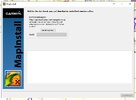
The MapInstall app is also avail as standalone version under:

Hope this helps...
I clicked on the Download button here. I also got the 7zip, but no clue how to use it, lolWhich file? (there a number with various content for various units...)
Download Archive
To unzip the file you may need a packing program (e.g. 7zip ) You
can download the free program 7zip here. There is a 32bit & 64bit variant.
The file (20260115_OSM_MAP_SIMPLE_Europa.zip) is 2970.91 MB in size,
the download may take some time, depending on the line quality.
Please click on Download Button ..

- This download is split! Please download all files.
- 20260115_OSM_MAP_SIMPLE_Europa.z01
- File size: 3072 MB
- 20260115_OSM_MAP_SIMPLE_Europa.z02
- File size: 3072 MB
- 20260115_OSM_MAP_SIMPLE_Europa.z03
- File size: 3072 MB
- 20260115_OSM_MAP_SIMPLE_Europa.zip
- File Size: 2970.91 MB
I installed it to a Temp directory, but what is the *.zip file I need to click on?Get 7zip (free download), install, highlight the *.zip file, right-click and [extract to \...]
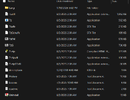
I got to that point. but...- put SD card into card reader
- format as FAT32 (like with https://www.sdcard.org/downloads/formatter/ )
- create a folder *:\Garmin on that SD card
- open the MapInstall feature of your BC - you mean "Maps/Install Maps"?
- select your SD card [*:\Garmin] as target drive - Only Zumo connected to PC can be selected.
- select the map-tiles of the desired area/countries (watch the bottom bar for the remaining/max memory of 4GB on target drive directory...)
- once inserted into your satnav it should reckon the new mapset...
Last edited:
OK, zis is growing into a project 
once 7zip is installed on your machine, its simply added to your cursor menu/panel, which can be opened via right-hand click (or hidden in the [more options] panel in Win11...)
so you mark the downloaded [20260101_OSM_MAP_STREET_SIM_Europa.zip], click right, select [7zip], select [extract to]...
You've however selected/downloaded the large mapset offered there, hence it comes in 4 parts, which each need to be extracted into the same temp directory
(further down you'd find the "Simple Openstreetmap street map for Garmin Europe without TYP file" which is <4GB...)
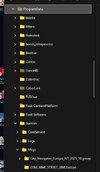
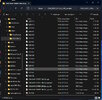
Inside the directory/folder you've extracted the mapset into, you'll find the installer.exe:
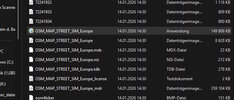
this will again prompt you to specify a target directory & folder on your computer the mapset shall be installed to...
Ideal:
"C:\ProgramData\Garmin\Maps\20260101_OSM_MAP_STREET_SIM_Europa"
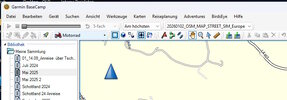
After that BaseCamp should offer the OSM in the top bar...
The MapInstaller should look like this:
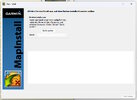
it will only reckon an SD card when there has been a folder named [Garmin] created...
IMO it should then not matter of its in an SD card reader or inside the satnav...
(GF has a small Zumo 220...)
once 7zip is installed on your machine, its simply added to your cursor menu/panel, which can be opened via right-hand click (or hidden in the [more options] panel in Win11...)
so you mark the downloaded [20260101_OSM_MAP_STREET_SIM_Europa.zip], click right, select [7zip], select [extract to]...
You've however selected/downloaded the large mapset offered there, hence it comes in 4 parts, which each need to be extracted into the same temp directory
(further down you'd find the "Simple Openstreetmap street map for Garmin Europe without TYP file" which is <4GB...)
Inside the directory/folder you've extracted the mapset into, you'll find the installer.exe:
this will again prompt you to specify a target directory & folder on your computer the mapset shall be installed to...
Ideal:
"C:\ProgramData\Garmin\Maps\20260101_OSM_MAP_STREET_SIM_Europa"
After that BaseCamp should offer the OSM in the top bar...
The MapInstaller should look like this:
it will only reckon an SD card when there has been a folder named [Garmin] created...
IMO it should then not matter of its in an SD card reader or inside the satnav...
(GF has a small Zumo 220...)
Last edited:

Maybe someone in your circle of acquaintances can log on to your PC with TeamViewer (or alike) to aid through a couple of the steps... 
LOL! 
I (still) run with my reliable '04(!) Garmin Quest-I...
Already in 2006 Garmin decided to discontinue their City Select map-sets and switch to City Navigator... not compatible with the Q-I... (right... you ought to buy a new kit every year... )
)
So since 2008/09 I'm working with/on OSM maps...
Back then a seriously "scientific", lengthy, multi step ordeal to get those onto your PC and then onto the little navigation assistant...
You could only download & install each country individually, neither the plotting software (MapSource) nor the GPS unit were able to calculate/navigate across borders...
so you had to cut the routes right at the border crossing, switch the active map & start the next leg of the tour... and the same procedure backwards on your way home...
No comparison to these days with the automated *.exe installer, and having "Europe all" provided in one product/tile-set...
Over here many, many riders with older, still perfectly working GPS/satnavs using OSM...
Other users with different interests (MTB, climbing, skiing, hiking, geocaching...) use specific OSM mapsets (like with elevation model) on current GPS units/models...
I've no idea how alive the OSM community is over there in the states... nor if there is any group/forum specialized on this open source project who could provide more/detailed support...
I've also no idea about which step doesn't work on your end...
While we were starting this debate, I installed a new map-set from above source right here on this Win11_64pro PC at my office... flawless...
I'd be really surprised if your edition of Base Camp (or even the Zumo) has like a "geo-block"...
Since Garmin (again) has decided to discontinue a map-series (NT maps are superseded by their NTU maps), I'll also have to feed my GF's Zumo 220 with OSM on a micro-SD to keep it up to date...
Bound by the <4GB limit of the FAT32 system on the SD card, I select the "general area/countries" of tiles we intend to travel in MapInstall while monitoring the "storage bar" at the bottom...
(even worse on my Quest-I with only <420KB internal memory, requiring to select a "corridor" of map-tiles along the planned routes...)
When searching for genuine "GARMIN City Navigator NT Benelux-France, Micro-SD, suitable for navigation devices" they're avail, starting at like € 40,- upward...
But I can't see which year, thus how current they actually are... likely half of the roundabouts or bypass roads are missing...
i.e.
I (still) run with my reliable '04(!) Garmin Quest-I...
Already in 2006 Garmin decided to discontinue their City Select map-sets and switch to City Navigator... not compatible with the Q-I... (right... you ought to buy a new kit every year...
)So since 2008/09 I'm working with/on OSM maps...
Back then a seriously "scientific", lengthy, multi step ordeal to get those onto your PC and then onto the little navigation assistant...
You could only download & install each country individually, neither the plotting software (MapSource) nor the GPS unit were able to calculate/navigate across borders...
so you had to cut the routes right at the border crossing, switch the active map & start the next leg of the tour... and the same procedure backwards on your way home...
No comparison to these days with the automated *.exe installer, and having "Europe all" provided in one product/tile-set...
Over here many, many riders with older, still perfectly working GPS/satnavs using OSM...
Other users with different interests (MTB, climbing, skiing, hiking, geocaching...) use specific OSM mapsets (like with elevation model) on current GPS units/models...
I've no idea how alive the OSM community is over there in the states... nor if there is any group/forum specialized on this open source project who could provide more/detailed support...
I've also no idea about which step doesn't work on your end...
While we were starting this debate, I installed a new map-set from above source right here on this Win11_64pro PC at my office... flawless...
I'd be really surprised if your edition of Base Camp (or even the Zumo) has like a "geo-block"...
Since Garmin (again) has decided to discontinue a map-series (NT maps are superseded by their NTU maps), I'll also have to feed my GF's Zumo 220 with OSM on a micro-SD to keep it up to date...
Bound by the <4GB limit of the FAT32 system on the SD card, I select the "general area/countries" of tiles we intend to travel in MapInstall while monitoring the "storage bar" at the bottom...
(even worse on my Quest-I with only <420KB internal memory, requiring to select a "corridor" of map-tiles along the planned routes...
)When searching for genuine "GARMIN City Navigator NT Benelux-France, Micro-SD, suitable for navigation devices" they're avail, starting at like € 40,- upward...
But I can't see which year, thus how current they actually are... likely half of the roundabouts or bypass roads are missing...
i.e.
Garmin 010-11043-00 Maps of France and Benelux on SD-Card/microSD: Amazon.de: Electronics & Photo
Garmin 010-11043-00 Maps of France and Benelux on SD-Card/microSD: Amazon.de: Electronics & Photo
www.amazon.de

Andrew Shadow
Site Supporter
The attached document is written specifically for installing OSM maps on Garmin GPS's (Satnavs). I found it four or five years ago and downloaded it. I ended up never trying to do this so I have never even read the document in any detail so I have no idea how accurate it is or if it even works. At a cursory look it seems to be well done and quite detailed. Have a look, maybe there will be something in there that will help you out.I was a Cobol programmer for over 30 years, but this is beyond me... lol