Gps and more

Im a bit uncomfortable with a gps that useds my phone rather than satellites. I got stuck a few times when i changed directions.
But garmin seems to b the gps boss!
The Garmin gps units - all of them, including the XT - use satellites. It connects to auxiliary devices - phone, comm devices, etc. via bluetooth. The mapping function of the XT is limited or controlled by the presets you activate under settings, such as avoid toll roads, avoid gravel roads, shortest distance, shortest time, etc. For music and calling, the XT uses your phone. I'm not aware of any cell phones that use satellites. Of course, you can buy yourself an Iridium or Bluecosmo and have it all.

I don't think you can use the XT to let your phone (google maps) navigate for you...at least I've never read of that nor have I explored if it is possible.

With the XT, you can import trips that you have planned on your computer (a .gpx file) or even plan the route on the XT. The device will then use gps to navigate that route as you ride.
 
I may be misunderstanding your context but virtually all cell phones utilize satellites for the location function.
You are right, I stated what I meant poorly. The Garmin XT uses GPS - satellites for location, and it uses the owners bluetooth connected phone for cellular connected telephone and music. That is what I interpreted Pop-Pop was saying in his quote below 'a gps that uses....'

@Pop-Pop said, "Im a bit uncomfortable with a gps that useds my phone rather than satellites". The Garmin gps devices do not use the phone for location when they are linked via bluetooth. Using a phone for nav requires mastering other mapping apps. Using an XT will require mastering either the XT or Garmin's basecamp or other mapping software that produces a .gpx file. Having fought with both, I prefer Basecamp, but it is by no means an easy program to master.
 
I know that some iPhones can do satellite texting now. My son has one. His did not work sometimes when my Garmin inreach mini 2 would send a text.
 
If you have an android phone, use hi way radar app and it will integrate waze, radar alerts and a weather overlay as well.
Is there a secret button somewhere that I haven't found that is used to shut down this app? It does not stop running when I use the normal procedure to close an app. It doesn't close when I use the Close All Apps option either. Doing either one only minimizes it and it keeps running. The only way that I can shut it off is to use the Force Stop feature in the app settings.
 
Is there a secret button somewhere that I haven't found that is used to shut down this app? It does not stop running when I use the normal procedure to close an app. It doesn't close when I use the Close All Apps option either. Doing either one only minimizes it and it keeps running. The only way that I can shut it off is to use the Force Stop feature in the app settings.
That's what I do, force stop it.
 
I may be misunderstanding your context but virtually all cell phones utilize satellites for the location function.
I dont believe my phone gps works if my phone gets disconnected. Also, years ago, i changed direction in who cares texas, and my downloaded maps quit working.
 
I dont believe my phone gps works if my phone gets disconnected. Also, years ago, i changed direction in who cares texas, and my downloaded maps quit working.
The phone uses a global positioning satellite receiver the same as a GPS does. When it is connected to the cellular network it uses that to increase the accuracy. When it is disconnected from the network it still receives the GPS signal the same as a GPS does.

This is easy to test. Disconnect from your network and see if the GPS is still updating your location. Mine does.
 
That's what I do, force stop it.
Strange that it can't be shut down- I guess that they don't want us to ever turn it off.

Interesting app. I have only used it in the house so far but I will try it on the road while I am on the move.
One thing that I have already noticed is that it has difficulty distinguishing which aircraft are speed enforcement aircraft. As the crow flies I am only about three miles from an international airport. It is constantly issuing warnings about potential speed enforcement aircraft in the area when none of them are.
 
I can't figure out why my music from my Cardo Edge will not come back on after I shut down to refuel. I have to pull my phone out and turn it back on. Then I'm good to go until I shut the bike off again.

It might be the way that you have your BT linked. I have the XT2 at the centre of things. There is a BT connection from the XT2 to the Edge for sound. The phone is connected to the XT2 for calls. and data.
The phone is not connected to the Edge at all. In fact, I connect the Edge as the second device, so that if I need to update the software or used the Cardo app, I have the first channel to connect to. Once done, I delete that pairing.

It means that I cannot say 'Hey Google, Play Music on Spotify. At least I don't think I can. I realised that in order for it to work, I might need the phone to be on permanently and not go to the lock screen.
What I can so is start off a Spotify Playlist on the phone, and then I can use the Play, Pause, Skip and Next function by saying Hey Cardo. But to be honest, The BT connection for music usually has issues with passing traffic grabbing attention, or if may be due to data streams for traffic, Weather, upahead info coming in. I don't know.

I just use MP3 files on the SD card.

But with the XT2 getting a spotify playlist, the cardo edge spoken controls work and the buttons on the music player on the XT2 work. I just cannot choose tracks from spotify on the XT2 screen. That facility with the zpotify app on the Zumo 595 stopped working a long time back.

I've just checked it out again. When I turn the XT2 on, even getting music froma spotify play list runnign on my phone, the XT2 continues playing from where it left off within a few seconds of getting power. Even with the phone screen blank and in standby mode. With the phone locked, I can say Hey Google Play (Music) on Spotify - and google repsonds with "Got it", but then needs me to unlock my device. But if it is already playing something, it just picks up once I've pressed the Agree Button and then waited a couple of seconds.

Mine is an Android Phone.

nb THis info is sitting at my desk with Tread Active. I don't normally allow Tread to synchronise - something that you can control when installing, but which you cannot get rid of once installed without resetting the XT2 and deleting and reinstalling the Tread App. But the behaviour is the same as when it is on the bike. I've not ridden for 4 months, so I thought I'd better check !

Getting rid of the sync facilty makes a whole heap of problems go away. I have to transfer gpx files by USB cable, but I've always done that.

 
Last edited:
I dont believe my phone gps works if my phone gets disconnected. Also, years ago, i changed direction in who cares texas, and my downloaded maps quit working.

Unless it is an older phone it should work.
I have used phones as GPS for quite some time and I don't even have a sim card in them.
A good test is to put the phone in airplane mode and see if the location still works.
 
Unless it is an older phone it should work.
I have used phones as GPS for quite some time and I don't even have a sim card in them.
A good test is to put the phone in airplane mode and see if the location still works.
Ill try that! Hope im wrong!
 
Ill try that! Hope im wrong!
Also, make sure location services are turned on.
  • Turn on Location Services and Location Access for Maps. In the Settings app, tap Privacy & Security, then tap Location Services. Make sure Location Services is on, and Maps is set to While Using the App or Widgets.
 
Some map apps need a cell tower connection for the map data as it's not stored on the phone. Other map apps do store the data on the phone for offline navigation.

One of the best iPhone apps was Navigon by Garmin. I got the app at Macworld for $40 for all of the US. I could download and delete whichever states I needed and could navigate "offline". That is without a cell tower connection. GPS satellites fed my location to the app and stranger in a strange land I still knew where I was and how to get where I needed to go.

Apple Maps is mainly 'online' only so GPS will know where you are but you won't have turn by turn navigation without a cell tower connection. You can download an offline third-party map app or with iOS 17 and later you can download an offline app from Maps itself. This map will be of the area you expect to travel in.

The key is downloading an area (make sure you have the space on your phone) big enough for your travels. Download a different area as needed. Delete data as desired. Stray out of Maps or any third-party maps' offline areas and you lose turn by turn navigation. Then GPS says 'you're somewhere in Sherwood Forest'. You can drop a pin and send it to SAR for exfil.
 
Unless it is an older phone it should work.
I have used phones as GPS for quite some time and I don't even have a sim card in them.
A good test is to put the phone in airplane mode and see if the location still works.
Maybe I'm missing something. GPS is the outlines in a coloring book. Map apps fill in the colors as needed. Without map data already one the phone I don't see how GPS would provide turn by turn data that we think of as part and parcel of GPS.

Without a connection we can send our location to others. I know someone who was a cop for a local PD. He'd frequently use his iPhone to send long/lat to helos for aerial searches or last knowns. That works with or without a cell connection.

So without a SIM where did your turn by turn map data come from? An offline map would do it. Is that what you used?
 
Maybe I'm missing something. GPS is the outlines in a coloring book. Map apps fill in the colors as needed. Without map data already one the phone I don't see how GPS would provide turn by turn data that we think of as part and parcel of GPS.

Without a connection we can send our location to others. I know someone who was a cop for a local PD. He'd frequently use his iPhone to send long/lat to helos for aerial searches or last knowns. That works with or without a cell connection.

So without a SIM where did your turn by turn map data come from? An offline map would do it. Is that what you used?
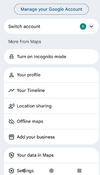
You have to download the maps of where you are wanting to use GPS. No different that if you have a Garmin device with NA maps and you want to take it to Europe. eg. for Google - download offline maps. click on your profile pic on top right corner and it brings up the menu below.
Most of the GPS apps have the ability to store maps on your phone negating any need for a cell or wifi connection.

New iphones have the capability to send txts via satellite although, it is still a bit sketchy from what I hear. To my knowledge, Android phones do not have this yet but they cannot be far behind. Once they have that, and it works at or near 100%, things like Spot Locator and Garmin inReach will become obsolete.

Yes, most of the GPS apps, combined with offline maps resident on your phone, provide turn by turn. Not all, but most will also do street names.
eg. in 200 meters turn turn right on "such and such" street. Many also tell you what lane you need to be in well in advance to having to turn.
No different than standalone GPS units like Garmin or TomTom. They have the maps resident in their memory and do not rely on any outside connections. They may require a cell connection if you want traffic or weather, but you do not need it for navigation with them, or with the phone apps.
The main GPS apps that I use are Google, Osmand+, and Myrouteapp but there are many others such as Rever, Locus, Gaia, Mapsme, Sygic.

1763936547515.png
 
You have to download the maps of where you are wanting to use GPS.
Yes I've said all that in my previous post. So you're downloading maps to use offline. Got it. It just wasn't clear from your post what you were doing.
 
And my phone is using the 3I/ATLAS and I can navigate the universe, eh :)
 
That's what I do, force stop it.
I figured it out Joe. If you hit the app's stop button first, then the app can be closed like any other app.

Another way to shut it down, if you are still using the default app settings, is by hitting the back button which will bring up a shut down option.
 
Last edited:
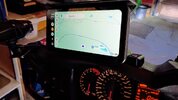
That's what I use since a year now (6"), I love it.
Android 14, Android Auto or Carplay, Google store access, meaning you can install any navigation app available, standalone (not phone dependent), external GPS and TPMS, OTA.
Pretty fast, but sometime hard to operate with gloves.
The 7 inches is on sale ($270).

IMG_20250826_094242263.jpg
 
Last edited:
Back
Top Bottom