Recommend Me a GPS

This could be renamed The Garmin Thread.... I'm a long time TomTom lover, they have always done everything I need whether riding bikes, driving cars or driving coaches. Currently using a Rider 550 for the bike and have a 5200 for the car (previously also used on the bike in a waterproof Givi case). If I want to pre-plan not on the Satnav then I use the free PC Version of MyRoute-app which allows me to plan a route and then save as an .itn file so I get a route (with multiple waypoints), and not a track, on the Satnav. Also means I have the route available on the MyRoute-app on my phone, should something happen to the Satnav!
 
Last edited:
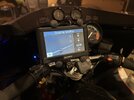
I used this very simple process to "weather-proof" the Garmin car units:
  • stick a piece of Post-It note paper on the screen,
  • gently trim it with an X-Acto knife just a tad smaller than the size of the screen (accuracy is not important)
  • run a very small bead of silicone bathtub sealer around the screen
  • smear it down into the edge of the Post-It note with a wet fingertip
  • allow to cure for 30 min or so
  • remove the Post-It note paper.
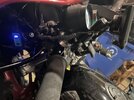
....and WAH-LA - you now have a motorcycle-rated GPS unit that will survive on your handlebars (see attached photos).
A little history or background. Garmin used to have two similar GPS...probably decades ago now. The Nuvi 550 and the Zumo 550. The Nuvi 550 was priced like a car GPS but did everything the motorcycle Zumo model did...but was probably half the price. A lot of people got smart and bought the less expensive model. Garmin dropped the Nuvi model and for years afterwards, you could get a Nuvi car GPS that still did everything but only had speakers to relay info to the driver. No BT support. Now it looks like the car units are using BT to connect to phones and if you can hear voice instructions from your phone, I'm sure you can get them into a BT headset through your phone. The customer's demands and competition brought Garmin back to where they were years ago.

So if it works, the Garmin Drivesmart models have everything from a 5 inch model at $149 to an 8 inch model at $349. At $249, the 6 inch model would be a steal. And MaxPete's method of "waterproofing" your car GPS works well from what I've heard.


This could be renamed The Garmin Thread.... I'm a long time TomTom lover, they have always done everything I need whether riding bikes, driving cars or driving coaches. Currently using a Rider 550 for the bike and have a 5200 for the car (previously also used on the bike in a waterproof Givi case).
I tried the TomTom Rider 550. I wanted to like it. The screen is smaller than the Garmin models like the 590 and XT, but the side bar that shows at a glance when your turn is coming up, or a gas station is ahead made up for that. Except it turned out to give me bad information. I doubt it was the device, but more likely it was the map data they used. In the western two-thirds of the USA, gas stations are just around the corner...in town. Go out of town and it can be a different story altogether. So I plan my route...and my gas station stops. Far too often, I rode past a gas station that looked like it had been around for 20 years and the TomTom had no clue it was there. I suspect it is different over in Europe. The USA seems to have been taken over by Garmin. In Europe, I've heard TomTom is the dominant player.

I like to enjoy music on long stretches. If I remember correctly, TomTom doesn't let you store music on the device, but instead uses your smartphone for the storage. Not a problem as I have a lot of music on the phone. Except my TomTom would keep going to one of the subscription based streaming sources like Spotify or Amazon. And it kept trying to do this, even when I was out of any cellular service. The distraction of constantly having to change the music source was the straw that broke the camel's back. I wanted something that was not a constant irritant or distraction. So I returned it. And bought a Garmin.

Chris
 
USA seems to have been taken over by Garmin. In Europe, I've heard TomTom is the dominant player.
This was my experience. Garmin worked better in NA whereas TT worked better in the rest of the world. Osmand based maps work better than both since it is open source and constantly updated.
I like to enjoy music on long stretches. If I remember correctly, TomTom doesn't let you store music on the device
The TT's that I had (granted, older models) had an SD card for storing extra maps, music etc.; Played the music fine from it. I don't think the newer models have a builtin music player. The SD card now is for storing map data only.

I have gone to using a dedicated (ie. inexpensive, no SIM card, IP7) rugged smartphone and various apps for navigation. One of the biggest reasons is the ability to change apps depending on where you are going. eg. use Gaia for off road and Osmand, Google, Myroute, etc for roads. Another reason is map upgrades and maps for different areas of the world. It has been a while, but the last time I used either Garmin or TT, I had to pay to get EU, AU, Asia maps onto my NA device and they were not inexpensive although I see now that TT comes with lifetime world maps. Since virtually all the apps have the ability to work offline, accessing maps, and POI databases has become a non issue.

I have got around the vibration impact on the electrical connection by using a magnetic connector. Several thousand miles of off road use and so far (touch wood) there have been no issues.

GPS preference is not unlike tires, oil, seats, windscreens, etc. People tend to be comfortable with what they are familiar with.
 
Last edited:
Yup - I've got a ZUMO 660 which I like very much, although it is a tad clunky (big and chunky).

I also use a RAM-ball phone mount with the 4-arm flexible fixture to hold a more modern NUVI-2590 model (and several others) that are intended for cars. Even though I live in Canada and we are the world's leading experts in crappy weather, none of these car-units have ever shown any signs of distress in rain (or worse).

I used this very simple process to "weather-proof" the Garmin car units:
  • stick a piece of Post-It note paper on the screen,
  • gently trim it with an X-Acto knife just a tad smaller than the size of the screen (accuracy is not important)
  • run a very small bead of silicone bathtub sealer around the screen
  • smear it down into the edge of the Post-It note with a wet fingertip
  • allow to cure for 30 min or so
  • remove the Post-It note paper.
....and WAH-LA - you now have a motorcycle-rated GPS unit that will survive on your handlebars (see attached photos).

GPS-1.jpeg

I installed a cheap "chinoise" USB power supply/battery volt meter on a simple home-made bracket in the fairing of my '83 BMW R100RS long distance machine. I use a "curly-coily" USB cord (Amazon - about $8.00) to power the GPS and I am in good shape for whatever comes my way.

Oh - and these Garmin units have Bluetooth, which can interface with my CARDO PackTalk Bold headset and give me audio directions (although I have never wanted the electronic mother-in-law to be yakking in my ear and drowning out the Doors, the Travelling Wilburys, or the Stones....). I find the visual cues of the Garmin to be quite sufficient.

GPS-3.jpeg
I took an old Nuvi, turned it on and dropped it in a pail of water. Took almost an hour to die.

Greg
 
The Carpuride products might be worth looking at. I did some quick reading on them earlier. Most people buy them to listen to their music. The GPS function they have from what I read, not personal experience, comes from the smartphone you pair it with. As one reviewer put it, it is a smartphone extender.

Almost all GPS programs that use a cell phone, will allow you to download the maps beforehand. I just find that one more thing to remember and something I'd probably forget to do till I got out of cell phone range and needed the map.

The price of that Zumo XT above that I linked to and the Carpuride W702B Plus are the same price at $380. It makes for an interesting comparison.

Chris

I was looking at the Carpuride, but it won't be convenient if I need the phone running the app for an all day ride.

I think I want a GPS unit that will provide turn by turn without using my phone.

I don't know which ones those are nor how to load the gpx file onto it.
 
Still using A Garmin 2820 & a Zumo 550. I could care less about turn by turn directions and programing routes. I seen some of my riding buddies spent a shitload of time planning a day route and getting directed onto gravel roads and unplanned dead ends. I just want to be aware of where I am at a given moment, what is coming up ahead, and the shortest way back to base(home or motel).
 
I don't know which ones those are nor how to load the gpx file onto it.
No matter what you choose, there will be a learning curve.
I just want to be aware of where I am at a given moment, what is coming up ahead, and the shortest way back to base(home or motel).
Offline google maps will do that. Get a cheap, rugged phone (lots of used ones around) and you are good to go. Just need a mount and +/- power (direct or via tankbag/battery bank)l. No need for any cell plan or sim card.

Ziploc bag and an elastic band takes care of any issues with rain but most phones nowadays are pretty water resistant.
 
I was looking at the Carpuride, but it won't be convenient if I need the phone running the app for an all day ride.

I think I want a GPS unit that will provide turn by turn without using my phone.

I don't know which ones those are nor how to load the gpx file onto it.
Running the phone all day could be an issue. When I hit the motel room, before I get distracted I start plugging things in to recharge. So this would be one more item to recharge.

Very seldom have I ever loaded a GPX file onto my GPS. They say the XT2 allows you to plan your route on the device. I've done that all the time from the beginning of taking trips.

My method is simple. Plot out my route on Google maps. Figure out which roads I want to take and force the route onto those by inserting a waypoint in Google Maps. Then all I do is duplicate the same thing on the GPS. It's quick, simple and doesn't require any software like Basecamp.

The simple way to make sure the GPS routes you through an intersection correctly, is to place your waypoint just down the road from the intersection. I found early on that having it take me to Main St and 1st wasn't enough. Do I turn right or left? And a few times, I turned the wrong direction. The GPS wouldn't give me the turn guidance till I'd gone through the intersection. So I set the waypoint just past the intersection. As I've said earlier, I use my gas stops for breaks and so I have those plotted in on the route as well.

And when I finish, there's no translation issues of the plotting software trying to be read by the GPS software and which map did each use. It's just done.


Another advantage to buying a motorcycle GPS is that it is designed for the environment we ride in. On Labor Day weekend 2020, I rode with some friends to a rally in Oregon. It was hot. Temps got up to 115 for portions of the ride, and stayed in the triple digits for hours. My Garmin didn't overheat on me. The last thing I needed was to have my GPS quit working (with no warning) because it overheated while I'm trying to get to my motel room and I'm relying on it for directions a hundred miles away.

What none of us knew going back home, was the Santiam Fire had exploded from the dry heat and 50 mph winds. That ride home in the smoke, heat and 50 mph side winds was as fast as we dared to go with no idea when it would quit or what the situation was. I'm glad I had my standalone motorcycle GPS (see @Flexit , I didn't say "Garmin" ;) :D ), instead of trying to go cheap and possibly regret it.

Chris
 
Running the phone all day could be an issue. When I hit the motel room, before I get distracted I start plugging things in to recharge. So this would be one more item to recharge.

Very seldom have I ever loaded a GPX file onto my GPS. They say the XT2 allows you to plan your route on the device. I've done that all the time from the beginning of taking trips.

My method is simple. Plot out my route on Google maps. Figure out which roads I want to take and force the route onto those by inserting a waypoint in Google Maps. Then all I do is duplicate the same thing on the GPS. It's quick, simple and doesn't require any software like Basecamp.

The simple way to make sure the GPS routes you through an intersection correctly, is to place your waypoint just down the road from the intersection. I found early on that having it take me to Main St and 1st wasn't enough. Do I turn right or left? And a few times, I turned the wrong direction. The GPS wouldn't give me the turn guidance till I'd gone through the intersection. So I set the waypoint just past the intersection. As I've said earlier, I use my gas stops for breaks and so I have those plotted in on the route as well.

And when I finish, there's no translation issues of the plotting software trying to be read by the GPS software and which map did each use. It's just done.


Another advantage to buying a motorcycle GPS is that it is designed for the environment we ride in. On Labor Day weekend 2020, I rode with some friends to a rally in Oregon. It was hot. Temps got up to 115 for portions of the ride, and stayed in the triple digits for hours. My Garmin didn't overheat on me. The last thing I needed was to have my GPS quit working (with no warning) because it overheated while I'm trying to get to my motel room and I'm relying on it for directions a hundred miles away.

What none of us knew going back home, was the Santiam Fire had exploded from the dry heat and 50 mph winds. That ride home in the smoke, heat and 50 mph side winds was as fast as we dared to go with no idea when it would quit or what the situation was. I'm glad I had my standalone motorcycle GPS (see @Flexit , I didn't say "Garmin" ;) :D ), instead of trying to go cheap and possibly regret it.

Chris

Unfortunately, google maps will not work for me. I like to plan routes that aren't necessarily the fastest way from point A to point B. So I use waypoints. Google maps has a limit on the number of waypoints we can use.

That's why I prefer to use ridewithgps or mapmyride. I'm not interested in the fastest route. I want the route I chose.
 
FWIW, there is a free software called GPSBabel that converts pretty much any GPS format to other GPS formats.
I still use MS Streets & Trips and translate the routes to .kml (Google maps) and my Chinese GPS is perfectly happy with it.
 
Unfortunately, google maps will not work for me. I like to plan routes that aren't necessarily the fastest way from point A to point B. So I use waypoints. Google maps has a limit on the number of waypoints we can use.

That's why I prefer to use ridewithgps or mapmyride. I'm not interested in the fastest route. I want the route I chose.
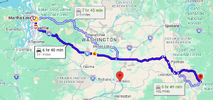
I agree. It is the same principle though with the other programs you are using. In a week, I'll be headed to Kamiah, ID. I know where I'm going, but I'll use that as an example.
  1. GM defaults to Highways. That gives me a baseline in case the amount of time exceeds what I think I can make.
    1778192748722.png
  2. Under Options, select Avoid Highways. That adds an hour.
    1778192813274.png
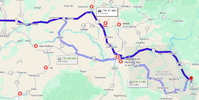
  3. In this case, there are few options for getting over the Cascade mountains. You have to hit one of a few passes, and the Seattle Metro traffic is such that you want to get out of it as quickly as possible. So I'll blend the two of these routes together. I'll take I-90 across Snoqualmie Pass and to Ellensburg. Eastern Washington is flat and dry. It can be hot as well getting to triple digits so I don't want to linger exploring farm roads. Plus keep in mind that those travel times don't include stops for gas or simply rest. I'm looking at a 9.5 hr day probably.
  4. Gas becomes a consideration. I need two fillups to be comfortable. And some of these close up when they roll the town's streets up in the evening.
    1778193426080.png

    But while this is the most efficient route per GM, it isn't the "best" route. And at this point, it is time to tell GM what I want to do. So I drag the route over to Hwy 261 which wasn't even on the GM route and hit one of the forgotten gems of Eastern Washington and the Palouse. That's a waypoint I add to force the route where I want it to go.

    1778193694780.png
    It's too far out to see the detail, but that's just one fun turn after another and the reward for putting up with Hwy 26 and the miles and miles of straight road.
  5. And that puts me on Hwy 12, one of the most scenic roads you'll find except for the part going into Lewiston. It runs next to the river through there and should be a "bucket list" ride for anyone passing through the area.
    1778193902302.png
  6. FWIW, if you're passing through the area, continue on Hwy 12 over Lolo Pass into Montana. Another "bucket list" ride. ;)
So I'll take this route plotted on GM and simply put a few waypoints in my XT to force it to go the same way. I'll put in the first gas station around Othello. The second outside of Clarkson/Lewiston, which will get me in to Kamiah.

It's not like the East Coast area where there are lots of roads, all interconnected. But if I ran into the issue of the number of waypoints, I'd just split the route up on browser tabs and then do the same thing. Often I find that I don't need to put in each turn because the GPS will take the same route I would between two waypoints.

So I hope this little bunny trail off the main discussion helps someone who is just getting into planning a route.

Chris
 
Last edited:
FWIW, there is a free software called GPSBabel that converts pretty much any GPS format to other GPS formats.
I still use MS Streets & Trips and translate the routes to .kml (Google maps) and my Chinese GPS is perfectly happy with it.
UP's option is fine...but you can eliminate that step by simply creating the route in the GPS itself.
 
UP's option is fine...but you can eliminate that step by simply creating the route in the GPS itself.
But if you have a bunch of routes to do (like a multi-day long trip) and you want to carry a backup GPS - just in case - that would be very time consuming to do it on the machine. You might eliminate 'that step' but you will also spend a lot of time peering at a smaller screen and wearing out your fingers - especially if you are travelling a specific route to see stuff! ;)
BTW, I happen to be a software developer, so I wrote a program that allows me to take all the routes in a folder and with a couple of clicks, they are converted from MS S&T to .kml (by GPSBABEL) and downloaded to the GPS. The Chinese GPS just looks like a USB drive and all you do is copy the .kml routes to a particular folder on the device. Installing new maps is just as easy - delete the old map folder and copy the new maps to the properly named folder. Last time I checked a new map set is $10. The GPS is being sold on Alibaba for $75 now. And it is waterproof, glove friendly and has the same warranty as Garmin - 1 year IIRC. :biggrin:
 
Last edited:
Not really. Load it on GPS #1. Export it as a GPX file.

So UP...are you saying you buy two ... 2...Chinese GPS to make sure you have something that works? Or is it three??? :D :D :D That does change the financial commitment of going with 1 Garmin vs 2 or 3 Chinese GPS's to make sure you have something that works. :roflmao:
 
I have a Zumo XT2 and previously a XT - I don't do all the pre-planning and downloading of multiple routes as I generally like to use a real paper map to plan my rides. I usually just search for my destination on the GPS itself so I don't run into all the issues that people complain about regarding the Garmin units. The one thing that Garmin has nailed is the bright screen on the XT series. I was so surprised when I first got my XT that I can see the maps perfectly even in bright sun. I enjoy the music features but don't use my phone when riding so that is not really important to me. I found the weather tracking feature very handy and surprisingly accurate last summer as I was dodging thunderstorms and heavy rain across Utah and Nevada.
 
This is my plug for never having your cell phone on your bike as your "GPS"...rider I knew died on a rural coastal Washington road. Investigation found that he had his cell phone on his bike. He died looking for the cell phone. If you only have one cell phone, it needs to be on your body.

GPS...I've been using Garmin now for 26 years and would never use anything else. I've briefly tried Magellan and android products...didn't work for me. My point, use what works for your mind. I also travel using DeLorme Atlas and Gazetteer paper maps for the states I travel in. But I'm weird like that. I also use Zoleo...for my family, they'll at least know where I left the roadway over the embankment...

I know, OCD to carry two cells, Garmin 395LM, Zoleo, ResQLink, and paper maps. But then I also travel with a Glock, actual paper money, and cigs/booze (great barter items) incase the zombie apocalypse starts when I'm riding...:o)
 
FWIW, there is a free software called GPSBabel that converts pretty much any GPS format to other GPS formats.
I still use MS Streets & Trips and translate the routes to .kml (Google maps) and my Chinese GPS is perfectly happy with it.
Tried that (and other tools) while ze GF still had her TomTom Rider 5, didn't work, the routing on the TT always differed largely from the original plotted in the Garmin utilities as the conversion deletes too many details...
(tried it also with the latest TT Rider 550, same skittish route results upon import, even when trying to mimic the original route on their MyTomTom online plotting tool, the resulted routing will vary widely, simply over the different navigation preferences of the device, and map materials in use...)

Far worse had the TTR5 that annoying RUT bug, means it will not let you miss a start/shaping/routing point, and starts insisting that you have to make a U-turn back to it... :rolleyes:
Completely useless when diverting due roadworks, stopping for fuel, having lunch, coffee or sightseeing...
It ended with me organizing a Zumo 220 for ze GF's NT700VA, which also suffers its genuine "Zumo-flaws" (like that entire series... :rolleyes:) but at least 'we're on the same page' while out riding ;)

And of course had the Garmin product designers nothing better to do that to copy that BS in their latest Zumo and XT models... 😒
If you get off the route for whatever reason they actually expect you to stop, open the properties of the active route and select [skip intermediate points] for a new entry...
But for editing the shaping/routing points one must first know their actual names/numbers... which are like "random"... 🤔

A befriended couple, he ST1300, she NC750X, has two Zumo 396, both running the same firmware installed, both have same the same mapset version installed, both get the same route, build on BaseCamp loaded on, and then both show different routes/results upon import... hilarious!!!...
And dare we've to divert from the planned route for any given reason... both have to stop, hectically punching their screens... pfffff... ;)

That's why I prefer my +20 year old Garmin Quest-I (basically a miniaturized Street Pilot 3) so much...
When diverting from an active route it simply prompts "Off Route! Recalculate? [YES]-[NO]"... on which you either can press [NO], or simply ignore, as the prompt goes away after 1 minute...
It just keeps plotting along, stubbornly, displaying your relative position to the original, magenta bearing-line on the screen...
And when you pull back into the route, it just keeps ticking along on like n.o.t.h.i.n.g. e.v.e.r. h.a.p.p.e.n.e.d. ... "...in three kilometers bear right!... " ... acknowledged, thanx Hilde!... 😎
It also doesn't care if you miss the actual starting point, doesn't matter if you enter your route a few hundred meters, one, or fife kilometers later... its too simple, plain and bare of any "fancy features" to act out...

And that's what I prefer... a navigation assistant, absolutely reliable, unobtrusive, not distracting, calmly serving in the background...

 
I took an old Nuvi, turned it on and dropped it in a pail of water. Took almost an hour to die.
That's sad... what a waste... :(
I'm still using my old Nuvi 205 in the car... small, simple, fast, reliable, best "sales representative address finder" I can think off, and superior over any fancy 'OEM in-car system' by the simple fact that I can manage and upload my personal POI/favorites & client addresses on it via MapSource or BaseCamp...
 
Back
Top Bottom